Lab 11: Grid Localization (Real-World)
Real implementation of grid localization!
Prelab
The provided files were copied into the notebook and root directories:
- lab11_sim.ipynb: Pre-built optimized Bayes filter implementation for the virtual robot
- lab11_real.ipynb: Skeleton code for Bayes filter implementation on the real robot
- localization_extras.py: Pre-built localization module
The Bluetooth python modules from previous labs were copied: base_ble.py, ble.py, connection.yaml, and cmd_types.py.
Simulated Localization
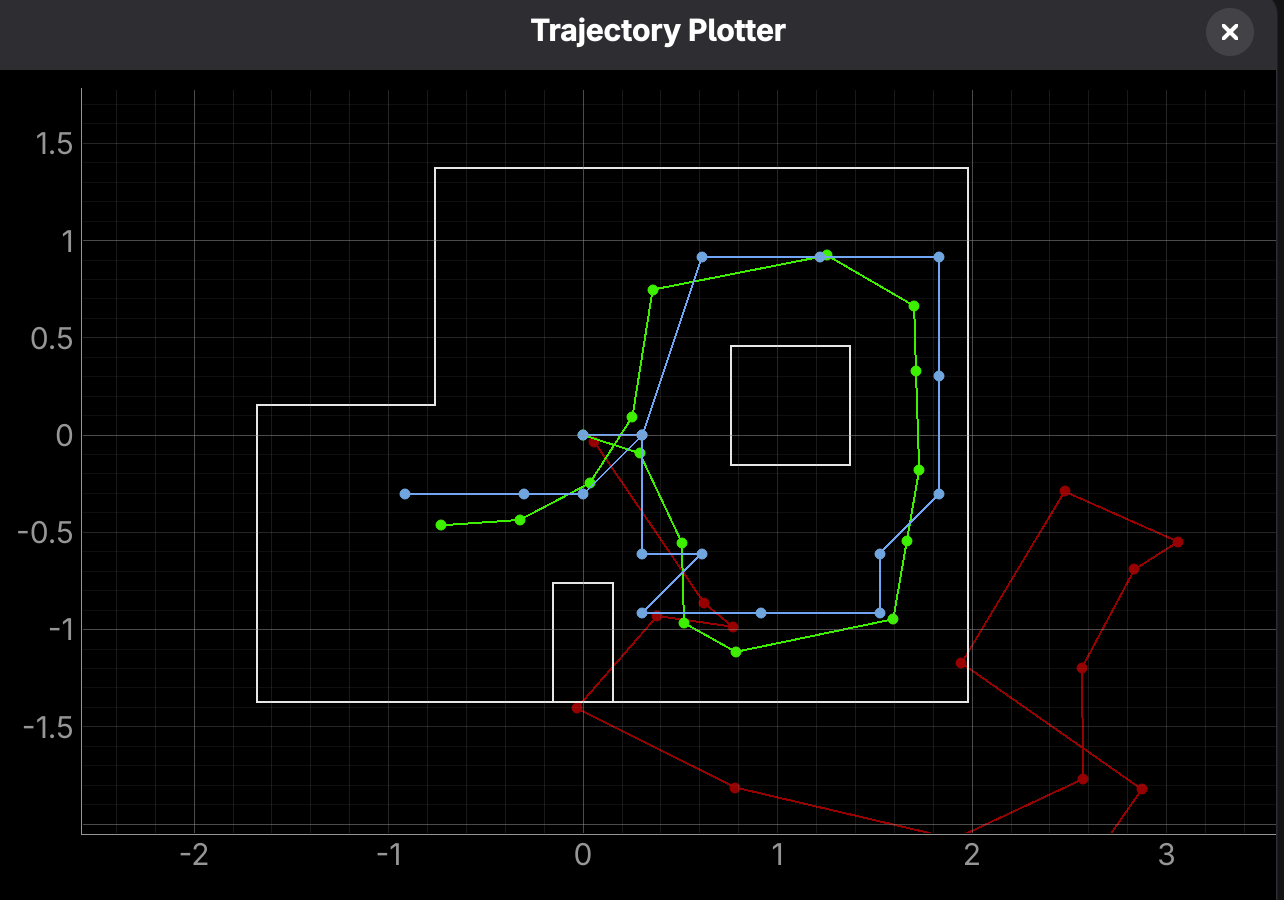
The simulated localization was tested with lab11_sim.ipynb, and the final odometry readings (red), ground truth (green), and beliefs (blue) are shown below:
Real Localization
The real localization is implemented in lab11_real.ipynb. Prediction steps are not done due to the noisy sensor measurements. Therefore, the Bayes filter only runs the update steps.
In the RealRobot class, the method perform_observation_loop commands the robot to perform an on-axis 360 degree turn while collecting equidistant sensor readings, similar to the COLLECT_PIDANGLE case in Lab 9.
    async def perform_observation_loop(self, rot_vel=120):

        self.sensor_ranges = []

        ble.stop_notify(ble.uuid['RX_STRING'])
        ble.start_notify(ble.uuid['RX_STRING'], self.notification_handler)
        ble.send_command((CMD.SEND), 1)
        ble.send_command((CMD.COLLECT_TOF), 1)

        count = self.config_params["mapper"]["observations_count"]
        increment = 360/self.config_params["mapper"]["observations_count"]
        ble.send_command((CMD.COLLECT_PIDANGLE), f"{1}|{increment}")

        await asyncio.sleep(60)

        npsensor_ranges = np.array(self.sensor_ranges)[np.newaxis].T
        npsensor_bearings = np.empty((0, 1))

        return npsensor_ranges, npsensor_bearings
The function returns numpy arrays of the distance values (in meters) and the sensor bearings (left empty since it is not needed in the Localization module). It uses a notifcation handler to receive the Bluetooth messages and append them to the array:
    def notification_handler(self, uuid, byte_array):
        msg = self.ble.bytearray_to_string(byte_array).strip()
        if msg.startswith("Sensor:"):
            try:
                parts = msg.split(";")
                val = np.float64(parts[0].split(":")[1])
                self.sensor_ranges.append(val/1000.0)
The observations_count paramater is taken to calculate the angle increment and send to the Artemis. By commanding the SEND, COLLECT_TOF, and COLLECT_PIDANGLE cases, the sensor data is sent to the notification handler.
Several changes to the Artemis code were made since Lab 9. First, I changed the main loop to automatically send back data once the 360 degree turn is completed, instead of having to command ble.send_command((CMD.COLLECT_PIDANGLE), 0).
Additionally, I added a send_increments function to send the sensor data only at the desired increment angles since the size of the arrays returned by perform_observation_loop is expected to match the observations_count. This also drastically speeds up the Bluetooth sending process, only having to send 18 values for 20 degree increments. I initialized a sensorReadings array, where both the ToF data and Kalman Filter values are appended to it. Then, send_increments sends back data at equal increments by tracking the array size. This assumes that the robot turns at a constant rate and does not backtrack. Therefore, the minimum PWM constant was reduced to get slower turns.
void send_increments() {
    int steps = (360/increment)-1;
    int interval = sensorIndex/steps;
    for (int i = 0; i < sensorIndex; i += interval) {
        tx_estring_value.clear();
        tx_estring_value.append("Sensor:");
        tx_estring_value.append(sensorReadings[i]);
        tx_estring_value.append(";");
        tx_characteristic_string.writeValue(tx_estring_value.c_str());
    }
}
The await function was used in perform_observation_loop to wait for 60 seconds for the 360 degree turn and receiving the Bluetooth data to complete. This also required adding the await and async keywords to get_observation_data:
await loc.get_observation_data() async def get_observation_data(self, rot_vel=120):
self.obs_range_data, self.obs_bearing_data = await self.robot.perform_observation_loop(
rot_vel)The Bayes Filter update will fail if the robot is mid-collection process or does not receive all data before the sleep finishes. 60 seconds was experimentally determined as a suitable length of time with around ~15 seconds of room for error.
Collecting Data
After initializing the RealRobot, mapper, and localization objects, the update step of the Bayes Filter is ran on four marked locations. Each trial was started with the robot facing 0 degrees.
(-3, -2) ft
.png)
data.png)
Belief: (-0.914 m, -0.914 m, 50), or (-3 ft, -3 ft, 50 degrees). Very accurate in the x location, but struggles with the angle.
(5, 3) ft
.png)
data.png)
Belief: (1.524 m, 0.610 m, -170) or (5 ft, 2.001 ft, -170). Again, accurate in the x direction, off by ~1 ft in y, and off in the angle by ~10 degrees.
(5, -3) ft
.png)
data.png)
Belief: (1.829 m, -.610 m, -10) or (6 ft, -2 ft, -10). Off in the x and y directions by ~1 ft, and off in the angle by ~10 degrees.
(0, 0) ft
.png)
data.png)
Belief: (0, 0, 30). Extremely accurate in position, 30 degrees off in angle.
Overall, it seems that the Bayes Filter biases towards whole values (in ft) and 10 degree angle increments, as I was surprised that its predictions were 3 significant figures close to the truth, or exactly 1 ft off.
The best results came from the (0, 0) location, which contrasts expectations from the simulation in Lab 10. My theory is that this location is unique in having walls within 1 m on all sides, so predictions are more confident. Also, the sensors struggle with reading longer distances. For example, when running multiple trials, the (5, -3) location would mistakenly output a location near (5, 3) or at points on the 5 ft x-axis. I believe this is from the sensor accurately reading the right wall, but struggling in the longer, open areas to the North and West.
The errors in the angle could be attributed to misplacing the robot's starting orientation when setting up manually, or an misaligned IMU. I noticed that the IMU would not lay completely flat on the robot's CoM due to a capacitor on the motor, so it must be shifted slightly offset. Therefore, the turning axis may not align with the marked location.
Collaborations
ChatGPT was used for debugging the perform_observation_loop function and the notification handler.